Twitch: Live Streaming
- 4.0
- Rating
- 100.00M
- Installs
- Free
- Price

 Analysis by App-foxy
I have used Twitch: Live Streaming as both a quick way to watch live entertainment and a place to follow creators over time. It is an entertainment app from Twitch Interactive, Inc., built around live video, real-time chat, and communities that form around individual channels. That focus makes it feel different from a normal video platform: you are not simply choosing something from a finished library, because the appeal often comes from being present while something is happening.
The app is free to install, and its Teen content rating is worth taking seriously because live broadcasts can vary considerably from one channel to another. In my experience, Twitch is most enjoyable when I treat it as a collection of communities rather than as one giant television service. The right channel can become part of my routine, while the wrong recommendation can feel noisy or irrelevant within seconds.
How Twitch feels today and where it fits
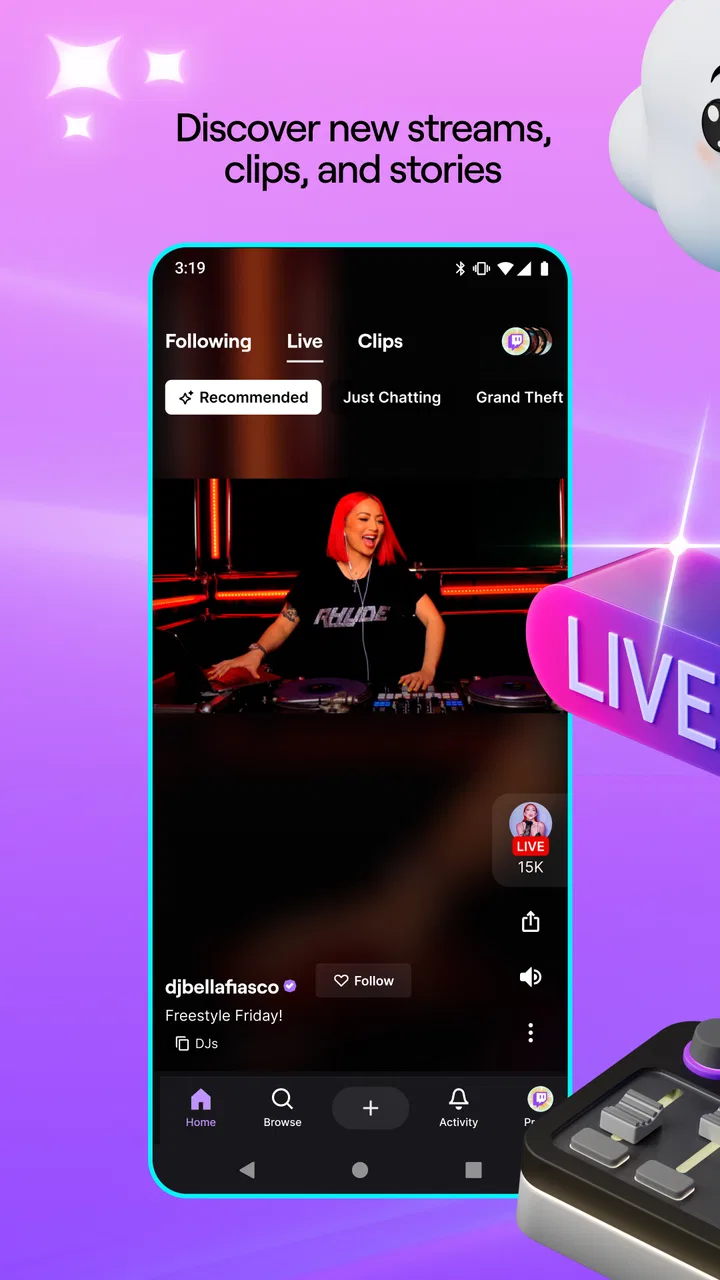
The basic experience is straightforward. I open the app, browse live channels, choose a stream, and watch while the conversation moves beside or below the video depending on the device layout. The store summary, “Stream, Watch. Chat. Live.”, captures the central loop, but the practical difference is how much participation surrounds the video. I can watch quietly, read reactions, join a conversation, or move between channels when a broadcast loses my interest.
In-Depth Coverage of Twitch: Live Streaming
That makes Twitch particularly strong for gaming, live commentary, creative broadcasts, informal talk shows, and events where audience reaction matters. It is less useful when I want a carefully edited lesson, a short answer, or a guaranteed schedule. YouTube is usually better for polished, searchable recordings, while a podcast app is more comfortable for listening without watching. Twitch earns its place when immediacy and community matter more than editing.
The app has reached a large audience, with over 100 million installs and an average rating of 4.0 from around 5.7 million ratings. Those figures suggest a service that is widely used but not universally loved. That matches my impression: the core idea is compelling, yet the experience depends heavily on the channel, the quality of the broadcast, and how much live chat you actually enjoy.
Finding something worth watching
Discovery is both the app’s strength and its main source of friction. Popular categories can offer plenty of choice, but a busy directory does not automatically tell me which stream is welcoming, informative, or worth my time. I have had better results by following creators whose style I already understand than by repeatedly opening the largest channels in a category.
A useful habit is to separate browsing from watching. I scan several previews first, then commit to one stream instead of leaving multiple broadcasts open while deciding. This matters on a phone, where switching frequently can turn a relaxing break into a stream of loading screens, loud introductions, and unrelated recommendations.
Following a channel is more useful than relying only on the home screen. It gives me a personal starting point and reduces the feeling that the app is choosing my evening for me. I also prefer to mute or minimize chat when I want the broadcast itself to take priority. The live conversation is central to Twitch, but it can become distracting when the channel is large or the topic moves quickly.
Watching on a phone in real life
On mobile, I find Twitch best suited to short sessions, background viewing, or a focused broadcast that I already intended to catch. A realistic example is an evening commute: I can follow a creator for a while, read the discussion when the train is steady, and close the app without needing to finish anything. At home, I am more likely to use a larger screen because chat and video compete for limited space on a phone.
Live video also demands more attention than an ordinary feed. A few minutes of poor connection, an overly busy chat, or a streamer taking a long break can make the experience feel empty. I recommend checking whether a channel’s style suits your available time before settling in. Some broadcasts reward long visits, while others are easy to enjoy in brief bursts.
For listening, the app can work, but I would not choose it automatically over an audio-first service. Twitch broadcasts are made for visual presence, and a creator may rely on on-screen gameplay, artwork, demonstrations, or chat reactions. If you only want spoken audio during work, a podcast or music app will usually be less demanding and more predictable.
What has changed in the product’s journey
Twitch has been available since May 20, 2015, giving it enough time to become a familiar name in live entertainment. Its evolution is easiest to understand not through one isolated feature, but through the way the app has matured into a place where watching and participating are closely connected. The current experience still feels rooted in live channels rather than in a conventional on-demand catalog.
That history matters for existing users. People who first came for a single game or creator can gradually use the app as a broader directory of live interests. At the same time, the larger ecosystem can make the service feel less personal. A new user may see an impressive amount of content without immediately understanding where to begin, while a long-time viewer may need to manage a crowded following list more deliberately.
You May Also Like

 Lords Mobile: Kingdom Wars
Lords Mobile Is a Kingdom-Building Routine, Not a Quick Match
A case-by-case verdict on the building, battles, device demands, and social commitments that make Lords Mobile rewarding for some players and exhausting for others.

 PDF Scanner app - TapScanner
TapScanner Makes Paperwork Easier to Capture, Check, and Share
TapScanner makes scanning with a phone feel less like a rescue operation and more like a dependable step in getting work done. Its capture tools are useful, though not flawless.

 Block Blast!
Block Blast! Shows How Much a Puzzle Game Can Leave Out
A quiet grid game shows why puzzle players increasingly value instant clarity, repeatable skill and low-pressure play—and where the genre still needs to catch up.

 Family Space
Family Space Review: A Shared Routine That Makes Family Life Easier
A parenting app earns its place not by adding more noise, but by making everyday coordination easier. Family Space gets that balance mostly right.

 1Weather Forecasts & Radar
1Weather Forecasts & Radar Makes the Daily Check Worthwhile
A good forecast does more than predict rain. This week's pick turns changing conditions into a clear, practical reason to check before you step outside.

 Clash of Clans
Clash of Clans Makes Patience Part of the Strategy
A village builder with a sharp tactical core, Clash of Clans turns patience into momentum and each raid into a small, satisfying act of judgment.
More From Our News Desk
View All News


I would describe the product’s development as an expansion of the live-streaming habit rather than a replacement for it. The essential promise remains real-time viewing and conversation. That consistency is useful: someone returning after a break can recognize the basic experience quickly. The trade-off is that Twitch does not always feel as streamlined as apps designed around a single format, such as short clips or edited video.
The developer, Twitch Interactive, Inc., has built a service whose value comes from scale and community behavior. Scale creates choice, but it also means that the quality of discovery varies. I can find a small channel with a friendly atmosphere or land in a crowded broadcast where individual messages disappear immediately. The app does not make those experiences feel equivalent, and learning to navigate that difference is part of using it well.
How the current experience affects established viewers
For someone who already follows several creators, Twitch can become a dependable routine. I can open the app to see who is live, choose a familiar voice, and use chat as a lightweight social space. This is more personal than a generic entertainment feed because the same creator, moderators, and regular viewers may appear repeatedly.
However, following too many channels creates its own problem. The list can become a stream of competing possibilities rather than a useful shortlist. I get more from the app when I treat follows as genuine subscriptions to my attention, not as bookmarks for every interesting broadcast I encounter. Periodically removing channels I no longer watch makes discovery feel calmer and makes the live indicator more meaningful.
Chat is another area where long-time users develop their own approach. I enjoy it when the audience is small enough for comments to have context, but fast-moving chat can be difficult to follow and may contain jokes or arguments that overwhelm the broadcast. New viewers should not feel obligated to participate. Watching silently is a perfectly reasonable way to use the app, and hiding chat can improve the experience when the conversation becomes a distraction.
Notifications can help existing users catch a favorite creator, yet too many alerts can make the app feel demanding. I prefer to reserve notifications for channels I genuinely do not want to miss. For everything else, I check the following area when I have time. This small adjustment makes Twitch feel like something I choose rather than something that interrupts me.
Where the app still leaves gaps
The biggest gap is consistency. A live platform cannot control every broadcast, so the quality of video, sound, pacing, moderation, and conversation changes from channel to channel. If I want a reliable, edited presentation, Twitch may frustrate me. A creator can be excellent one day and unusually quiet the next, and there is no guarantee that a stream will deliver the same value as its title suggests.
Discovery can also be less precise than I would like. Categories help, but they do not replace personal judgment. A viewer who wants a specific tutorial, a short review, or a complete explanation may spend more time searching than learning. In those situations, an on-demand video platform is usually the better tool because its results are easier to scan and revisit.
Live chat creates a social atmosphere, but it also brings noise. The larger the channel, the less likely it is that my message will receive attention, and rapid discussion can make the interface feel cluttered. Smaller creators often provide a more conversational experience, although that depends on the individual channel rather than on the app itself.
There is also a financial boundary that new users should understand. The app is free, but in-app purchases range from $0.99 to $1,598.00 per item. I would approach optional spending carefully, especially when a live broadcast encourages quick emotional decisions. Setting a personal limit before buying anything is sensible, and viewers should remember that free viewing is still the main way to use the service.
The Teen rating means families should not assume that every channel is suitable for younger children. Live content is less predictable than a preselected cartoon or an edited educational program. I would choose channels deliberately, discuss viewing habits with younger users, and avoid treating the general app as a fully controlled children’s environment.
Practical ways to get more from Twitch
My first recommendation is to build a small, intentional following list. Start with creators you actually enjoy, then add new channels only after watching enough to understand their tone. This improves the app more than endlessly adjusting recommendations because it gives the home experience a clearer personal signal.
Second, use chat according to the kind of viewing you want. If I am watching a tournament or a detailed demonstration, I reduce chat and focus on the video. If I am joining a relaxed discussion, I keep it visible and accept that the conversation is part of the entertainment. Treating chat as optional rather than mandatory prevents much of the app’s clutter from becoming a deal-breaker.
Third, choose channels by format, not only by topic. Two streams in the same category can be completely different: one may be fast and competitive, another slow and explanatory, and another centered almost entirely on audience conversation. Looking for the right pace is often more important than choosing the supposedly correct category.
Finally, decide whether you are browsing or attending. Browsing works well for a few spare minutes, while attending means giving one broadcast enough time to develop. Mixing the two can make every stream feel disappointing because I judge a long-form broadcast after only a few seconds. Twitch rewards a little patience, but it is not worth forcing myself to stay when the channel clearly does not fit.
Who should use it and who should skip it
I recommend Twitch to people who enjoy being present while content unfolds. It suits viewers who like gaming communities, live reactions, creator personalities, and the possibility of exchanging messages with other fans. It is also useful for anyone who wants to discover smaller creators rather than consume only highly polished mainstream video.
I would be more cautious if you dislike interruptions, unpredictable pacing, public chat, or content that requires active filtering. If your goal is a concise answer, a finished lesson, or background audio with minimal visual dependence, another service will probably fit better. Twitch is not a universal replacement for video, music, or podcast apps; it is a specialized choice for live participation.
Parents and guardians should also make a deliberate choice rather than handing over unrestricted access. The Teen rating reflects the open-ended nature of live entertainment, and the right channel matters more than the app’s attractive interface. For adults, the main question is simpler: do you want to watch a community in real time, or do you want content that has already been edited into its final form?
What I would watch as the service continues
For current users, the important things to watch are not just new visual changes but whether discovery becomes more useful without weakening the community feel. I would value clearer ways to distinguish a channel’s pace, conversation style, and replay value before committing to a broadcast. That would address one of the app’s most practical weaknesses without changing its identity.
I would also pay attention to how comfortable the mobile experience remains during longer sessions. Twitch is easy to open for a quick look, but extended viewing can expose the limits of a small screen, especially when chat is active. Any improvement that helps viewers move between watching and participating without losing context would make the app more flexible.
Spending and safety deserve equal attention. The broad range of optional purchase prices makes personal restraint important, while the Teen rating makes thoughtful channel selection necessary. I would not judge the app only by its most entertaining broadcasts; I would judge it by whether it helps viewers make informed choices about time, attention, community, and money.
After using it, my view is positive but specific: Twitch is excellent when I want live energy and a shared audience, and merely adequate when I want efficient, finished content. Its large community gives it unusual depth, yet that same scale creates noise and uneven quality. I would install it for live creators, gaming culture, and real-time conversation, but I would keep another video or audio app nearby for everything that benefits from editing and predictability. If you enjoy showing up while something is happening, Twitch is worth trying; if you only want the quickest route to a finished answer, it probably is not.
FAQs for Twitch: Live Streaming
01What is Twitch and how does it work?
Twitch is a live streaming platform primarily focused on video game streaming, but it also hosts streams about music, art, and other creative content. Users can watch live streams, chat with streamers and viewers, and even broadcast their own content. The app is available on both Android and iOS devices.
02Is Twitch free to use, or are there subscription costs involved?
Twitch is free to use, allowing users to watch live streams and access most features without any cost. However, there are optional subscriptions such as Twitch Prime and individual channel subscriptions that provide additional benefits like ad-free viewing, exclusive emotes, and support for streamers.
03How can I start streaming on Twitch?
To start streaming on Twitch, first set up an account. Then, download streaming software like OBS Studio or Streamlabs on your PC. Connect your Twitch account to the software and customize your stream settings. Mobile users can stream directly through the Twitch app by selecting the "Go Live" option.
04What safety measures does Twitch have in place for users?
Twitch implements several safety measures, including community guidelines, moderation tools, and reporting features to ensure a safe environment. Streamers can appoint moderators to manage chat, and users can block or report inappropriate content. Twitch also provides resources for mental health support and online safety.
05Can I make money on Twitch, and if so, how?
Yes, you can make money on Twitch through several methods. Streamers can earn revenue from subscriptions, Bits (Twitch's virtual currency), and advertisements. Additionally, Twitch offers the Affiliate and Partner programs, which provide more monetization options and benefits for growing streamers.
Pros
- High-quality streaming experience.
- Interactive chat with emotes.
- Variety of content creators.
- User-friendly interface.
- Easy to follow your favorite streamers.
Cons
- Ads can be intrusive.
- Requires stable internet.
- Mobile app lacks some desktop features.
- Notifications can be overwhelming.
- Limited parental controls.

Twitch: Live Streaming
Gallery